
THE AI OFFICE

Give the work to your AI team.

Build AI-powered departments that take on real operational work across your business.

Give one instruction. OfficeDesk delegates the work to the right specialists, coordinates it across your existing tools, and brings the finished outcome back for review.

Start with one department. Expand when you’re ready.
Works with the tools your business already uses.Xero · QuickBooks · Gmail · Slack · Google Drive · Google Sheets · Jira · + more
AI SHOULD DO MORE

You don’t need another AI tool. You need the work done.

Most AI tools give your team another place to ask questions.

But someone still has to decide what needs doing, write the prompts, move information between systems, check the output and make sure the job gets finished.

That’s assistance.

OfficeDesk is built to take work on.

Give the work somewhere to go.
Traditional AIYou ask.AI answers.You take it from there.
OfficeDeskYou assign the outcome.Your AI team coordinates the work.You review what comes back.
MEET YOUR AI OFFICE

What if AI worked like a team?

Your business is already organised around departments, responsibilities and specialist expertise.

Your AI should be too.

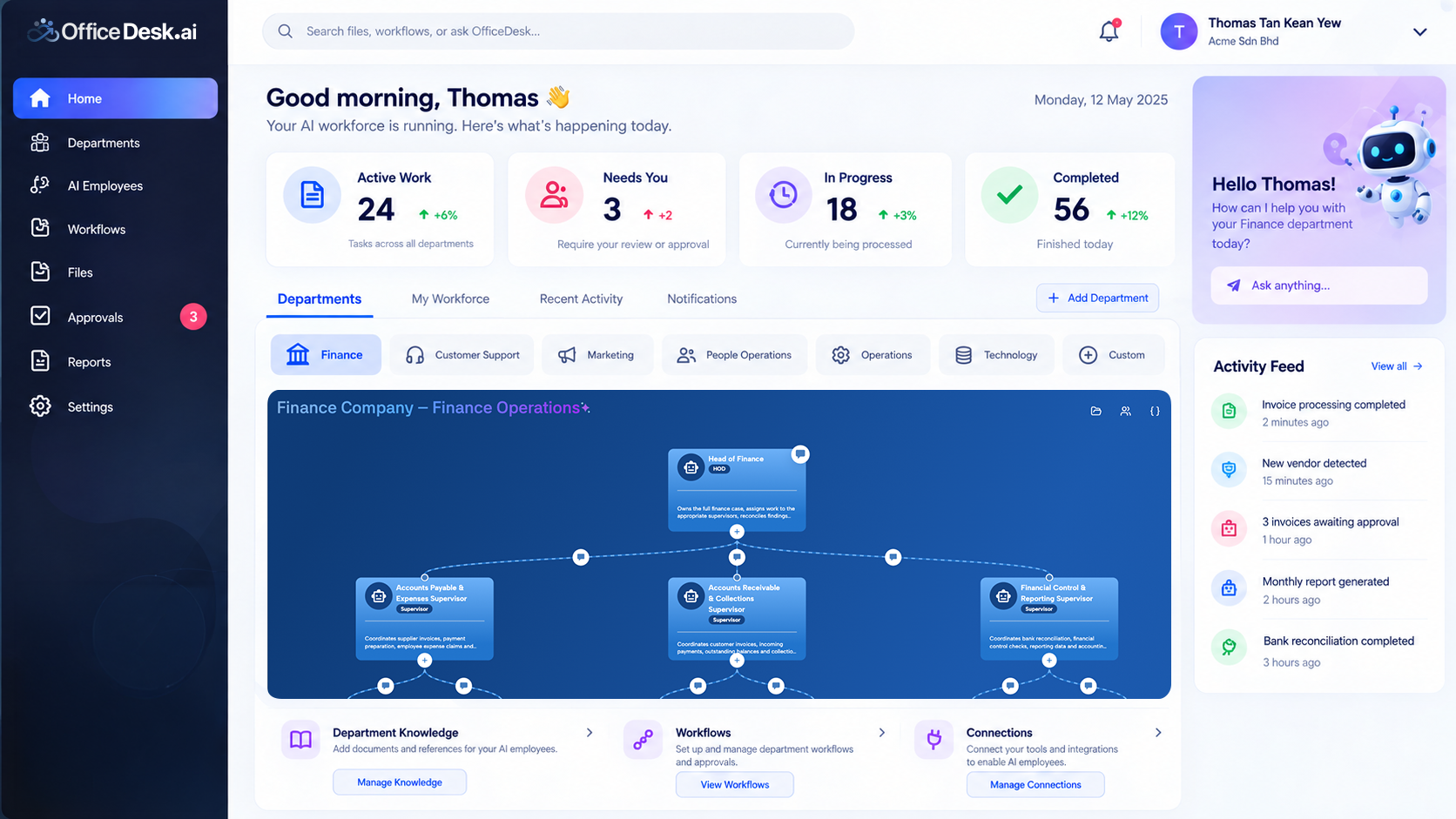
OfficeDesk gives each business function its own AI manager and specialist roles.

Managers delegate the work. Specialists execute it. The outcome comes back to you.

This is your AI Office.

Not one general-purpose AI trying to do everything. Specialised roles organised around real responsibilities.

YOUAI OfficeFinance ManagerReconciliation Agent · Reporting AgentMarketing ManagerContent Agent · Analytics AgentPeople ManagerOnboarding Agent · Records AgentProject ManagerEngineering Agent · QA AgentSupport ManagerInbox Agent · Escalation Agent
DELEGATION, NOT MICROMANAGEMENT

One instruction in. One coordinated outcome out.

You shouldn’t have to manage every AI employee yourself.

Tell the department manager what needs to happen.

The manager understands the task, delegates the right parts to the right specialists and coordinates the work across your connected tools.

When it’s done, the result comes back to you.

You manage the outcome. OfficeDesk manages the coordination.
Reconcile August, prepare the monthly summary and flag anything that needs my attention.Finance Manager
Reconciliation AgentLedger AgentInvoice Agent
Xero · Google SheetsAugust_Reconciliation.xlsx · Ready for review
ONE OFFICE. EVERY DEPARTMENT.

Hand over work across your business.

Start with the department carrying the biggest operational load today. Bring more online as your business finds more work to hand over.

Finance

Keep finance moving without the weekly scramble.

Give your Finance team the outcome and let specialised AI roles coordinate the routine work behind it.

Reconcile August, prepare the monthly summary and flag anything that needs my attention.

AI team: Finance Manager · Reconciliation Agent · Ledger Agent · Accounts Payable Agent · Reporting Agent

Typical work: Reconciliation · Document processing · Payables · Receivables · Reporting · Finance administration

Explore Finance
FinanceManagerSpecialised AI employeesConnected toolsReady for review
CONNECTED TO YOUR BUSINESS

Your tools stay.
The work moves.

Your operation already lives across accounting software, inboxes, spreadsheets, documents, project tools and communication channels.

OfficeDesk is designed to work with those systems instead of forcing your team to rebuild everything somewhere else.

Connect the tools a department needs. Give it the approved work. Let the team coordinate across them.

Explore integrations
OfficeDesk Manager

FinanceXero · QuickBooks · Google Sheets

CommunicationGmail · Outlook · Slack · WhatsApp

Files & documentsGoogle Drive · Dropbox

TechnologyGitHub · Jira · AWS

AI WORK. HUMAN CONTROL.

Your AI team does the work. You stay in charge.

Giving AI more responsibility shouldn’t mean losing visibility. OfficeDesk keeps work structured around defined roles, approved tools and review points.

  • See what’s happening.
  • Review what was completed.
  • Step in when judgement is needed.
  • Approve important actions before they move forward.
AssignedIn progress

11 supplier payments prepared

1 invoice requires review

Requires approval

See the work

Follow activity as departments and AI employees complete their assigned tasks.

Review the outcome

Completed work returns with the information you need to understand what happened.

Decide what proceeds

Keep human review and approval where your business requires it.

Automation shouldn’t mean giving up control. It should mean spending your attention where it matters.
WHAT CHANGES

More capacity without
more coordination.

OfficeDesk isn’t about replacing the judgement, relationships and decisions your people bring to the business.

It’s about reducing the amount of routine coordination competing for their attention.

MORE CAPACITY

Take repetitive operational work off the team’s plate so people can spend more time on customers, decisions and growth.

MORE STRUCTURE

Turn repeatable processes into defined workflows instead of keeping every step inside someone’s head.

CLEARER VISIBILITY

See what work was assigned, what happened, what was completed and what still needs a decision.

MORE CONSISTENCY

Give recurring work a repeatable operating structure that doesn’t need to be reinvented every time.

BUILD AT YOUR PACE

Don’t automate your whole business on day one.

Start with one job you repeatedly wish someone else could take care of.

Then build from there.

Your AI Office grows with your business.

You don’t need a giant transformation project. Start where the operational pressure is highest and expand when the value is clear.

  1. STAGE 1 — Start with one workflowExample: Monthly bank reconciliation
  2. STAGE 2 — Give the department more workReconciliation · Payables · Receivables · Reporting
  3. STAGE 3 — Add another departmentFinance · Customer Support
  4. STAGE 4 — Build your AI OfficeFinance · Customer Support · Marketing · People / HR · Technology · Operations
FROM REQUEST TO RESULT

Four steps between you
and finished work.

01 — Create a department

Start with a ready-made department or configure one around your business.

02 — Connect the team and tools

Set responsibilities and connect the systems the department needs.

03 — Assign the outcome

Tell the department what needs to happen in plain business language.

04 — Review the result

Follow progress and approve the actions that matter.

CREATE → CONNECT → ASSIGN → REVIEW
COMMON QUESTIONS

Before you build your AI Office.

What is OfficeDesk.ai?

OfficeDesk is an AI workforce platform organised into departments. You assign work to a department, its manager coordinates the relevant specialists, and the outcome comes back to you.

How is OfficeDesk different from ChatGPT or an AI chatbot?

A chatbot answers individual prompts. OfficeDesk coordinates defined operational work across specialised roles, connected tools and human review points.

Do I have to build and manage every AI employee myself?

No. You work primarily with the department manager. Give the manager the outcome you need and it coordinates the specialist roles responsible for different parts of the work.

Do we need to replace the software we already use?

No. OfficeDesk works with existing business tools such as Xero, QuickBooks, Gmail, Slack, Google Drive, Google Sheets and Jira. Connect the tools relevant to each department and keep your existing systems in place.

Can we start with only one workflow or department?

Yes. Starting small is encouraged. Choose a repeatable workflow creating operational pressure today, bring the relevant department online and expand when you’re ready.

How do people stay in control?

You define responsibilities, tool access and review points. Activity and outputs remain visible, and important actions can be brought back to a person for review and approval.

What departments can I create?

OfficeDesk can support department-based structures including Finance, Marketing, People / HR, Customer Support and Technology, as well as departments configured around your own operation.

Where should I start?

Start with work that is repeatable, time-consuming and follows a reasonably clear process. If you’re unsure which area has the best starting opportunity, take the AI Readiness Assessment.

Find my starting point
YOUR FIRST AI DEPARTMENT

What would you hand over first?

The reconciliation.
The overflowing inbox.
The onboarding checklist.
The weekly report.
The release paperwork.

The work doesn’t disappear because your team gets busier.

Give it somewhere to go.

Build your AI Office.

Start with one department. Give it real work. Expand from there.

No need to transform everything at once. Start with the work you’d most like off your plate.